


Digital Wayfinding
Wayfinding
Digital wayfinding – from the screen to the smartphone
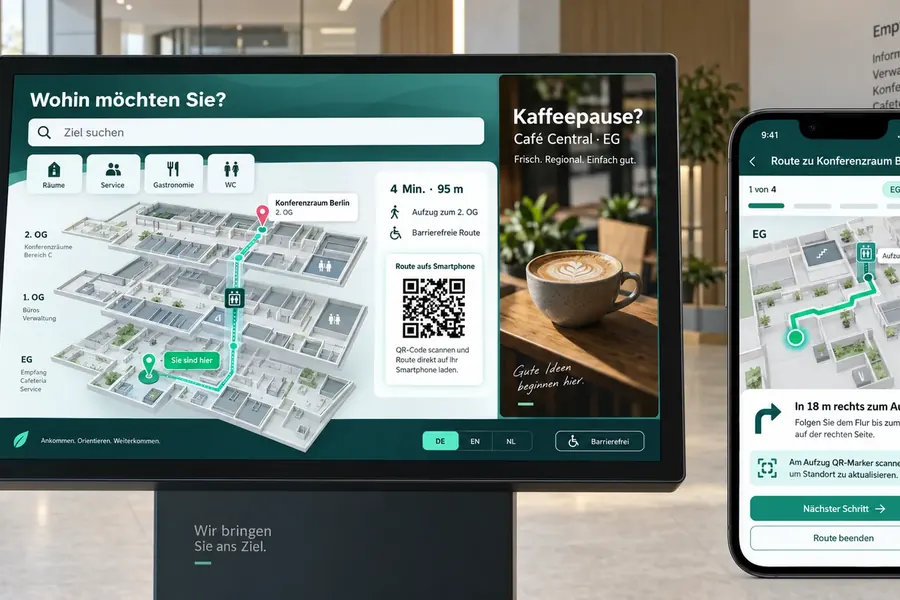
Rivano shows visitors the way from the screen’s location to their destination: across several floors, by lift, stairs or escalator, in a clear 2.5D view. With a QR code, visitors take the route along on their own smartphone – no app and no sign-in.
- Routes across several floors in a 2.5D plan view
- Accessible routes, for example by lift instead of stairs
- QR code for the route on the smartphone, valid for 15 minutes
- German, English and Dutch
- Combine with advertising and information in the same playlist

For visitors
Take the way with you instead of memorising it
On the screen, visitors see the route at a glance. The QR code opens the same route on their smartphone – step by step, floor by floor.
- View the route: start, destination, floors and estimated walking time on the screen
- Scan the QR code: the route opens in the browser, without an app
- Step by step: directions for lift, stairs or escalator when changing floors
- Privacy-friendly: the link contains no credentials and expires after 15 minutes
For operators
Create the building plan once, use it everywhere
The building plan is imported into Rivano once and can be used in any number of playlists. Each screen gets its fixed starting point, and you choose the destination per scene. One display can, for example, show the way to reception, meeting rooms and canteen one after another.
- Building plan imported as a data file; a new import creates a new version
- Automatic check on import: every destination must be reachable from every starting point, both regular and accessible
- Colours to match your design, on screen and smartphone
- Floor plans are converted into the Rivano format before import
- Hosting in Germany or on-premises
Frequently asked questions about digital wayfinding
What is digital wayfinding?
Digital wayfinding shows visitors the way to rooms, departments or services on screens instead of static signs. Changes in the building are managed centrally.
Where is wayfinding used?
In hospitals and clinics, public authorities, universities, office buildings, shopping centres, trade fairs and hotels.
Can visitors take the route to their smartphone?
Yes, via QR code. The route opens in the browser, without an app or sign-in. The link is valid for 15 minutes.
Are there accessible routes?
Yes. An accessible variant can be shown for every route, for example by lift instead of stairs. On import, Rivano checks that every destination can be reached accessibly.
Can visitors choose their destination on the screen?
In the current version, each screen shows routes set up in advance, which can run one after another in a playlist. Selecting a destination by touch is not part of the current version.
How do our floor plans get into Rivano?
Floor plan data – floors, rooms, paths, doors and lifts – is converted into the Rivano format before import. CAD/BIM import and automatic floor plan recognition are not available at the moment; we discuss with you how your plans are best taken over.
Is there live indoor positioning?
No. Rivano uses fixed starting points at screens and QR locations. Indoor positioning via Bluetooth or Wi-Fi is not part of the current version.
Technology & Solution Partners
STiNO works with trusted technology partners to deliver reliable, scalable, and future-ready digital communication and interactive display solutions.




Let’s Start a Conversation
Whether you’re planning a project or need expert advice, our team is ready to assist you with tailored solutions.